The 4-Day Sprint: How I Navigated a High-Stakes KMP Refactor
In the startup world, the pace is often compared to a Formula 1 race. It's really fast, and requiring decisions to be made in a heartbeat.
I recently found myself in one of those "seize the moment" scenarios. My native Android app was live and stable, when a key stakeholder in my company arrived with a familiar request: our client needed iOS support, and they needed it fast. Instead of falling into a panic, I viewed it as an opportunity to transition the project to Kotlin Multiplatform (KMP).
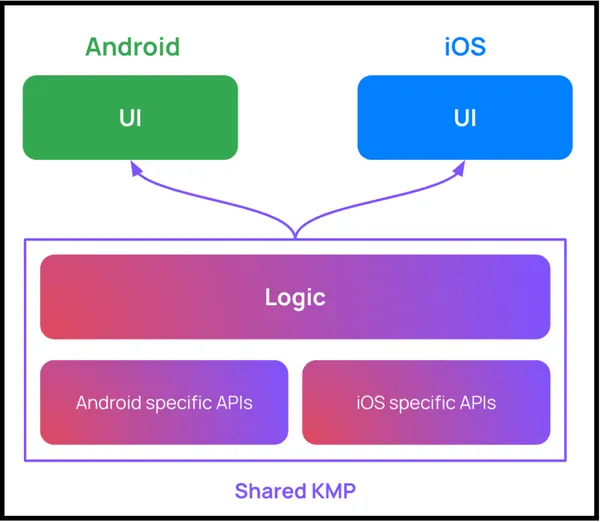
I've been delving deep into KMP for several months before this, and to me this seems like it could be a great way for me to test out the waters.
Scoping and Alignment
Before a single line of code was changed, I realized that the most important work happened outside the IDE. In a rapid-fire environment, you have to align your vision with the stakeholders immediately.
I spent time defining exactly what needed to be moved and managing expectations regarding the development cycle.
This clarity prevented the "scope creep" that usually kills short sprints.
Understanding the Flow
Once the scope was set, I spent time mapping the data flow from the API and database all the way to the UI layer. I had to identify every platform-specific dependency. For example, stuff like SharedPreferences, OkHttp or Android-specific Context calls. These were the parts that would eventually need to be abstracted using KMP’s expect/actual mechanism.
It wasn't about porting the entire UI, but rather it was about isolating the core business logic so it could live in a shared module.
The 4-Day Sprint
To give you a better idea of the transition, here are some key technical patterns I implemented during the 4-day sprint.
Be aware that these examples focus on the architecture, business logic, and cross-platform compatibility. It gives you the overall idea of how KMP can be implemented in a project and does not reflect how the project was actually implemented.
Day 1: Managing Dependencies with Version Catalogs
Moving to KMP is the perfect time to centralize dependency management. I used libs.versions.toml to ensure that both the Android and iOS targets stay in sync with the same library versions.
[versions]
kotlin = "2.0.0"
ktor = "2.3.11"
koin = "3.5.6"

[libraries]
ktor-client-core = { module = "io.ktor:ktor-client-core", version.ref = "ktor" }
ktor-client-okhttp = { module = "io.ktor:ktor-client-okhttp", version.ref = "ktor" }
ktor-client-darwin = { module = "io.ktor:ktor-client-darwin", version.ref = "ktor" }
koin-core = { module = "io.insert-koin:koin-core", version.ref = "koin" }
Day 2: The Multiplatform Network Stack (Ktor)
The core of the data layer migration was moving from Retrofit to Ktor. In commonMain, I set up a shared HttpClient that automatically chooses the correct engine based on the platform it's running on.
// commonMain/src/kotlin/network/NetworkClient.kt
fun createHttpClient(engine: HttpClientEngine) = HttpClient(engine) {
    install(ContentNegotiation) {
        json(Json {
            ignoreUnknownKeys = true
            prettyPrint = true
            isLenient = true
        })
    }
    install(Logging) {
        level = LogLevel.ALL
    }
}
Day 3: Abstracting Platform Specifics (Expect/Actual)
Whenever I encountered logic that required a specific platform API (like generating a UUID or accessing local storage), I used the expect/actual pattern to keep the commonMain logic clean.
// commonMain/src/kotlin/util/Platform.kt
expect class Platform() {
    val name: String
    fun logSystemInfo()
}

// androidMain/src/kotlin/util/Platform.kt
actual class Platform {
    actual val name: String = "Android ${android.os.Build.VERSION.SDK_INT}"
    actual fun logSystemInfo() {
        Log.d("Platform", "Running on $name")
    }
}

// iosMain/src/kotlin/util/Platform.kt
actual class Platform {
    actual val name: String = UIDevice.currentDevice.systemName() + " " + UIDevice.currentDevice.systemVersion
    actual fun logSystemInfo() {
        println("Running on $name")
    }
}
Day 4: Exposing Logic to Swift
One of the most satisfying parts was seeing the shared Repository being consumed in SwiftUI. By using an .xcframework build, the Kotlin code becomes a native-feeling library for the iOS side.
// SwiftUI View Component
import Shared

class ProfileViewModel: ObservableObject {
    @Published var userData: User? = nil
    private let repository = UserRepository() // Shared Kotlin Repository

    func loadUser() async {
        do {
            let result = try await repository.fetchUserProfile()
            DispatchQueue.main.async {
                self.userData = result
            }
        } catch {
            print("Error loading user: \(error)")
        }
    }
}
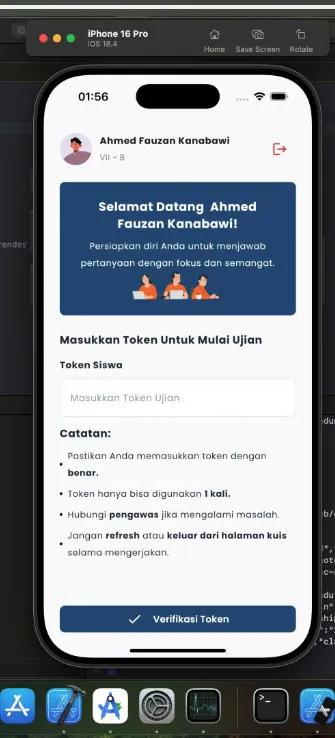
And that's it. Your Android native app is now running on iOS as well.
The X Factor: AI-Driven Planning
The real "X Factor" in making a 4-day timeline work was how I integrated AI into the workflow. Rather than just asking an AI to write code, I used it in "Plan Mode" to iterate on the refactor strategy before execution. By defining technical specs early, I saved hours of potential headaches.
I used the AI to help map out module boundaries and then relied on more cost-effective models to handle the repetitive boilerplate work once the architectural foundation was solid. For example for planning the refactor, I used Claude Opus 4.7. But when it came to generating the actual code, I used Claude Haiku 4.5.
With how pricing models for AI subscriptions has just changed (example for GitHub Copilot, see here, and here), this could be the most cost efficient way you can reduce token usage without sacrificing output quality.
Reflections for the Road
Reflecting on this process, I’ve realized that successful refactoring isn’t just a race to produce output. It is about the maturity of the plan and handling edge cases long before the project initiation.
While building applications may feel increasingly easier with AI assisting in code generation, there is one thing technology has yet to fully grasp: the ambient context. The human nuance behind a system. This is why strategic planning must remain our responsibility.
In my next post, I’ll dive deeper into why software engineering is not dead and how the vital role of humans with an overthinker mindset remains essential as AI continues to evolve.
Looking back, this transition taught me that successful refactoring is less about typing speed and more about planning. If you're attempting this, prioritize "KMP-First" libraries like Koin for dependency injection or Ktor for networking client.
Most importantly, remember to handle your Coroutines with care. Android dispatchers don't always behave the same way on iOS, so using a clean wrapper for Swift’s async/await is essential for a professional finish.
And also, don't be afraid to modularize early; keeping your data, domain, and feature logic separate will save you from a "shared module" that becomes a junk drawer.